RoastWeb: A Free AI Website Audit That Ranks the Fixes and Shows the Proof
How RoastWeb audits a landing page: seven scores from design to SEO, desktop and phone screenshots, Lighthouse speed, and fixes ranked by impact with proof from the page.

A landing page rarely fails for one dramatic reason. It fails because the headline says “Pricing” instead of who the product is for, because the pricing table shows “$0”, “Metered” and “Custom” without saying what a typical month costs, and because the only signup button sits in the first screen. Each problem is small. Together they decide whether a visitor stays.
Finding them is what RoastWeb, the website audit in Growth Atlas, is built for. You paste a URL, and in about two minutes you get a review of design, user experience, originality, copy, conversion, mobile and SEO, with phone speed, your search profile, and a list of changes in the order to make them. Every finding comes with proof from the page. This guide walks through a real sample report, explains how the scores are calculated, and shows where the tool’s judgement ends.
Key takeaway
- RoastWeb audits one public page and scores seven areas: design, user experience, originality, content and copy, conversion, mobile and SEO.
- Every area starts at 100. Each finding lowers it by a fixed weight (high 25, medium 12.5, low 6.25), and the overall score is the average of the seven areas.
- Speed and SEO findings are measured, not guessed: one Lighthouse run on a simulated phone and eight technical checks on the live page.
- Most findings carry evidence: a quote from the page, a measured value, or a marked region of the full-page screenshot, plus suggested wording when the fix is about words.
- Free with Google sign-in: 3 runs per account. You choose the AI model and the tone (gentle, honest or brutal).
What you enter and what you choose
The form takes one URL. Two optional controls change how the review is written, not what is measured.
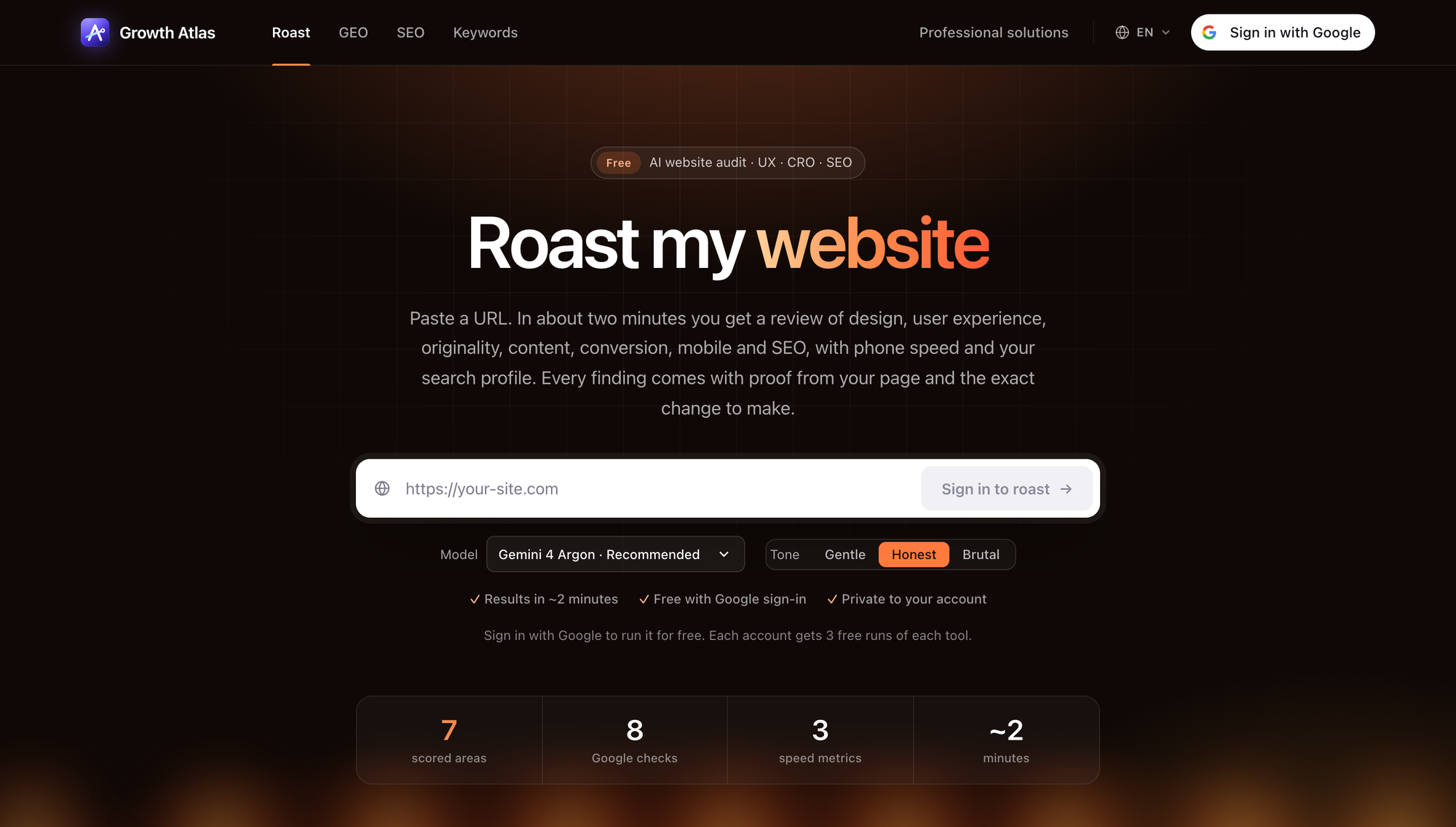 The RoastWeb form on 2026-11-20: one URL, a model picker, a tone switch, and the four numbers that describe every run (7 scored areas, 8 Google checks, 3 speed metrics, about 2 minutes).
- Model. On 2026-11-20 the picker offered Gemini 4 Argon (recommended), GPT-6.1 Sol (fast), Claude Sonnet 5.5 (most thorough), GPT-5.6 Sol (balanced), Claude Opus 5.5 (deepest, slowest) and GPT-6 Luna (lowest cost). The more thorough models tend to write more findings and take longer.
- Tone. Gentle, Honest (default) or Brutal. Brutal is blunter and shorter. It is still about the page, never the people who built it.
The report can be written in any of the 17 Growth Atlas languages.
How a roast runs
RoastWeb works in three stages:
- Fetch. Growth Atlas loads your public page, its robots.txt and sitemap, and extracts headings, calls to action, meta tags and visible text.
- Measure. SandBase data APIs take desktop (1920 × 1080), phone (360 × 800) and full-page screenshots, run Lighthouse on a simulated phone, and pull your search and link profile.
- Review. A vision model reads the page outline and the screenshots and writes findings for six areas. Speed and SEO findings come from the measurements. The scores follow from the findings.
That split matters. The model judges what needs judgement, such as whether the headline names the offer or whether the page shows real proof. Facts that can be measured, such as load time, title length or a missing canonical tag, are measured and never left to the model.
Reading the scores
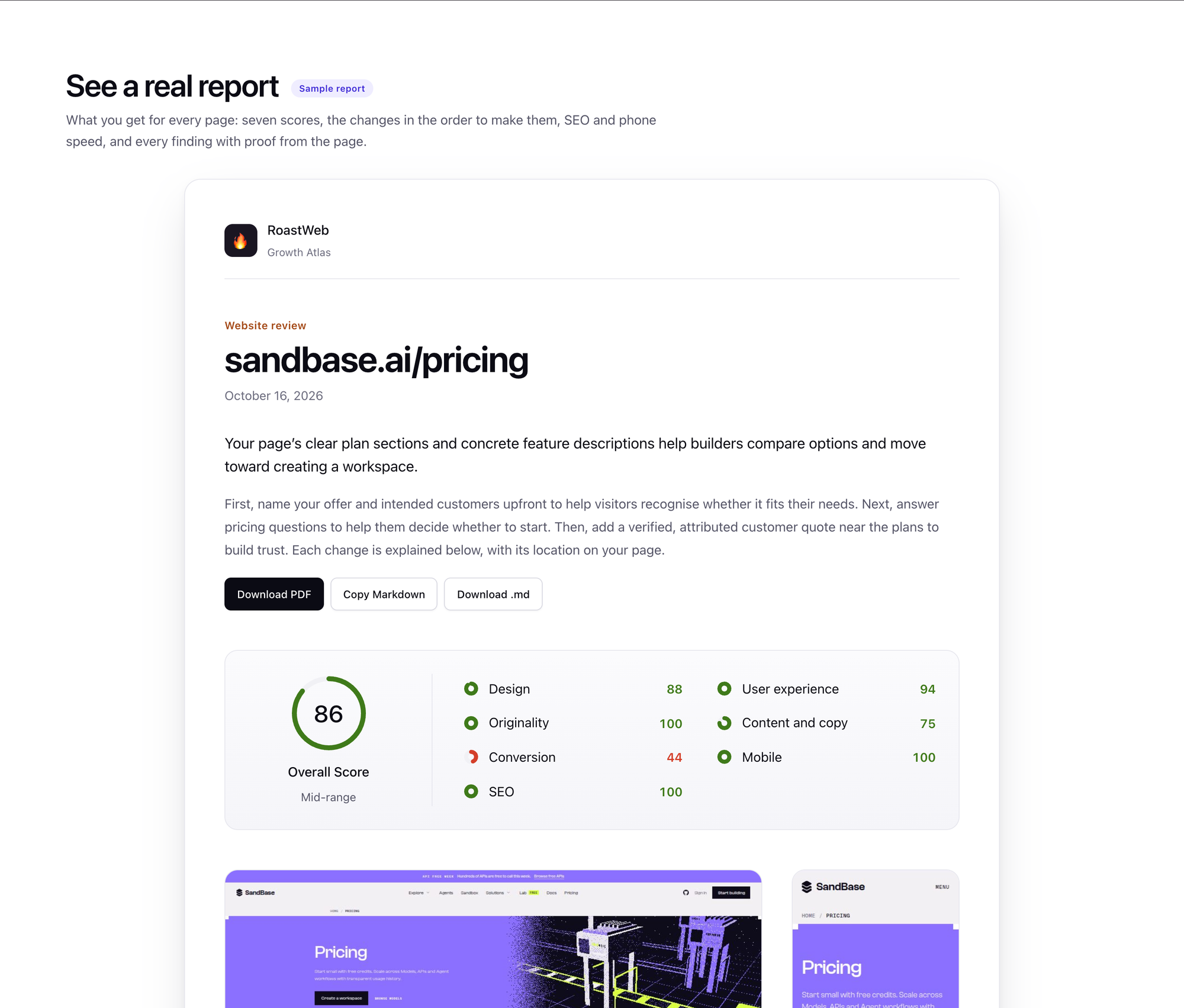 The sample report on the RoastWeb page, run on sandbase.ai/pricing on 2026-10-16. The overall score is 86 and Conversion is the weak area at 44.
The scoring is deliberately simple so that two reports can be compared:
- Every area starts at 100.
- Each finding lowers its area by its severity weight: high −25, medium −12.5, low −6.25.
- An area with nothing to fix stays at 100.
- The overall score is the average of the seven areas.
You can check the sample by hand. Conversion has four findings and lands at 44, which means it lost about 56 points. With four findings, the only mix that adds up is one high, two medium and one low (25 + 12.5 + 12.5 + 6.25 = 56.25). Content and copy has two findings and scores 75. The overall 86 is the average of 88, 94, 100, 75, 44, 100 and 100.
Area scores are rounded to whole numbers, so Design’s single medium finding (87.5) shows as 88.
Two things follow from this design. A low score in one area does not mean the page is bad; it means that area has several specific problems. And a score only moves when the list of findings changes. Measured findings (speed and SEO checks) are repeatable, so a re-run tells you reliably whether you fixed them. AI findings are written fresh on every run and can differ a little, so after a change, compare the findings one by one, not only the score.
Severity has a plain meaning. High means most visitors miss what is offered, cannot trust it, or cannot act. Medium is noticeable friction or missing proof. Low is polish.
The fix list: what to do, in order
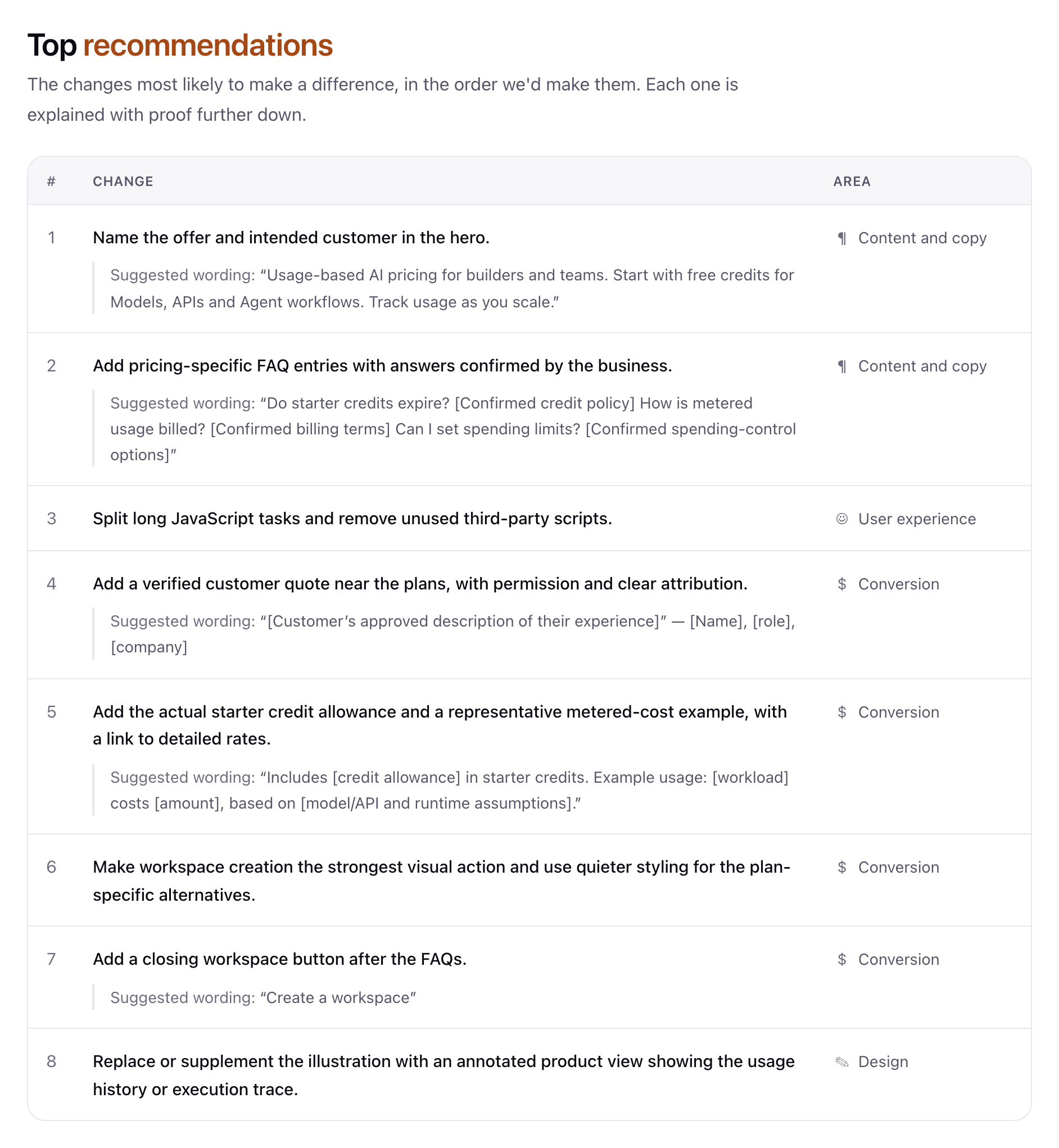 Top recommendations from the sample: eight changes in the order to make them, each tagged with its area. Copy fixes include suggested wording you can paste.
The top recommendations are the part most people act on. Three details make the list practical:
- Order. Changes marked “Do first” (quick, or the largest effect) come before “Plan it” (bigger work, such as collecting new proof or producing new visuals). Within each group the order is the order you would make the changes.
- Suggested wording. When the fix is about words, RoastWeb writes replacement copy. In the sample, the first fix proposes a hero line that names the offer and the audience instead of the single word “Pricing”.
- Placeholders, not invented facts. RoastWeb is told never to invent prices, customer names, numbers or policies. When a suggestion needs one, it leaves a bracket: “Includes [credit allowance] in starter credits.” You fill in the real value, or you skip the change if you cannot back it up.
That last point is easy to overlook. A testimonial suggestion in the sample reads "[Customer's approved description of their experience]" — [Name], [role], [company]. It tells you what kind of proof is missing; it does not hand you fake proof to publish.
SEO and phone speed: the measured part
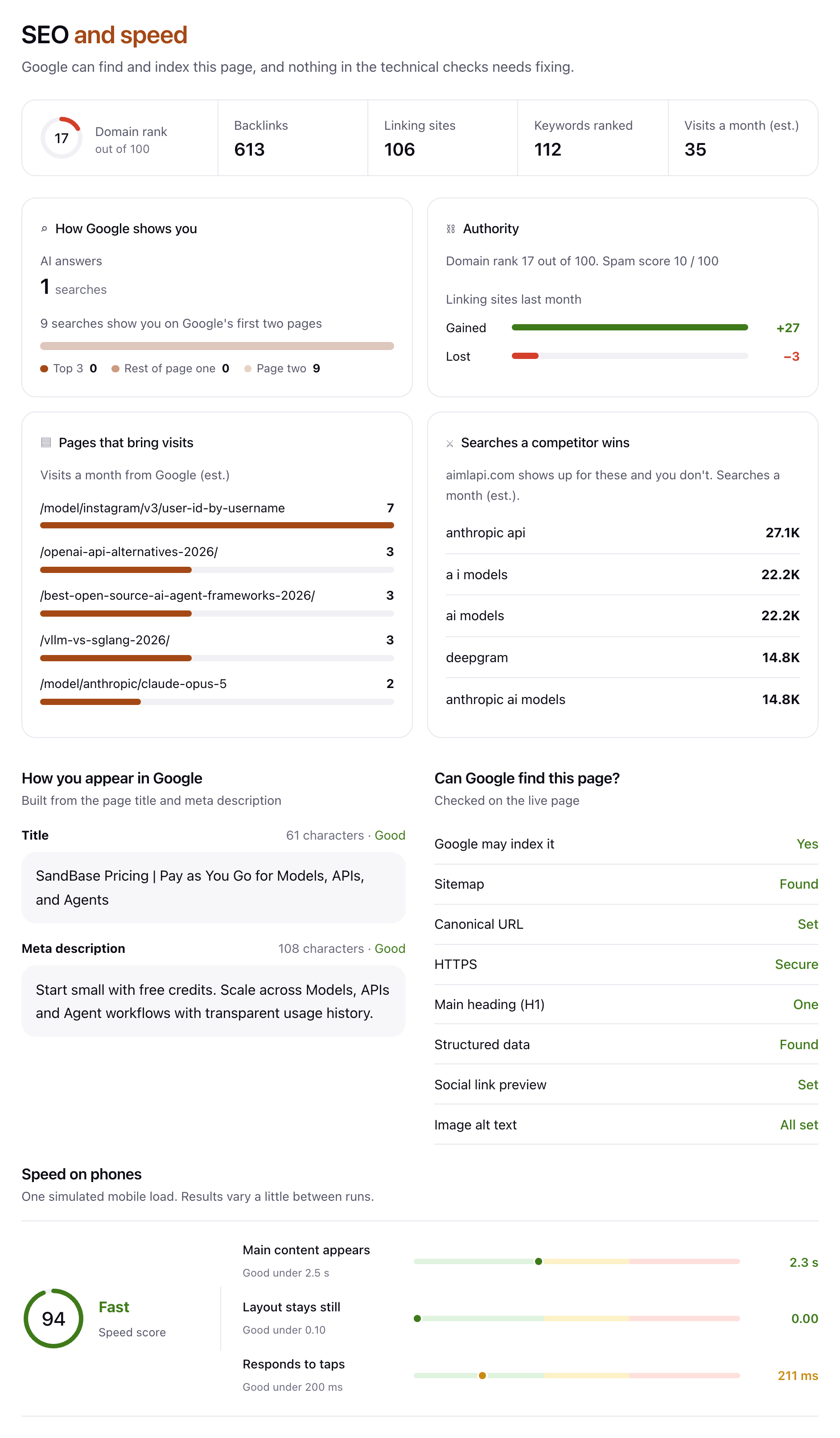 The measured section of the sample. The SEO profile and the eight “Can Google find this page?” checks come from data APIs; phone speed is one Lighthouse run on a simulated phone.
This section does not depend on the model’s opinion:
- Search profile. Domain rank, backlinks, linking sites, ranked keywords, estimated monthly visits from Google, the pages that bring visits, and searches a competitor wins that you do not. These are third-party estimates through DataForSEO.
- How you appear in Google. Title and meta description length. RoastWeb treats 30–65 characters as a good title and 70–160 characters as a good description.
- Can Google find this page? Eight checks on the live page: indexable (no noindex), sitemap, canonical URL, HTTPS, exactly one H1, structured data, social link preview and image alt text.
- Speed on phones. One Lighthouse load on a simulated phone, with three metrics: main content appears (good under 2.5 s), layout stays still (good under 0.10) and responds to taps (good under 200 ms).
In the sample, every technical check passes and SEO scores 100, but the tap response is 211 ms, just over the 200 ms line. RoastWeb turns that into a measured finding (“Split long JavaScript tasks and remove unused third-party scripts”) and places it third in the fix list.
A limit to keep in mind: Lighthouse results vary a little between runs, and RoastWeb runs it once. Treat a metric near a threshold as “borderline”, not as a verdict.
Findings with proof
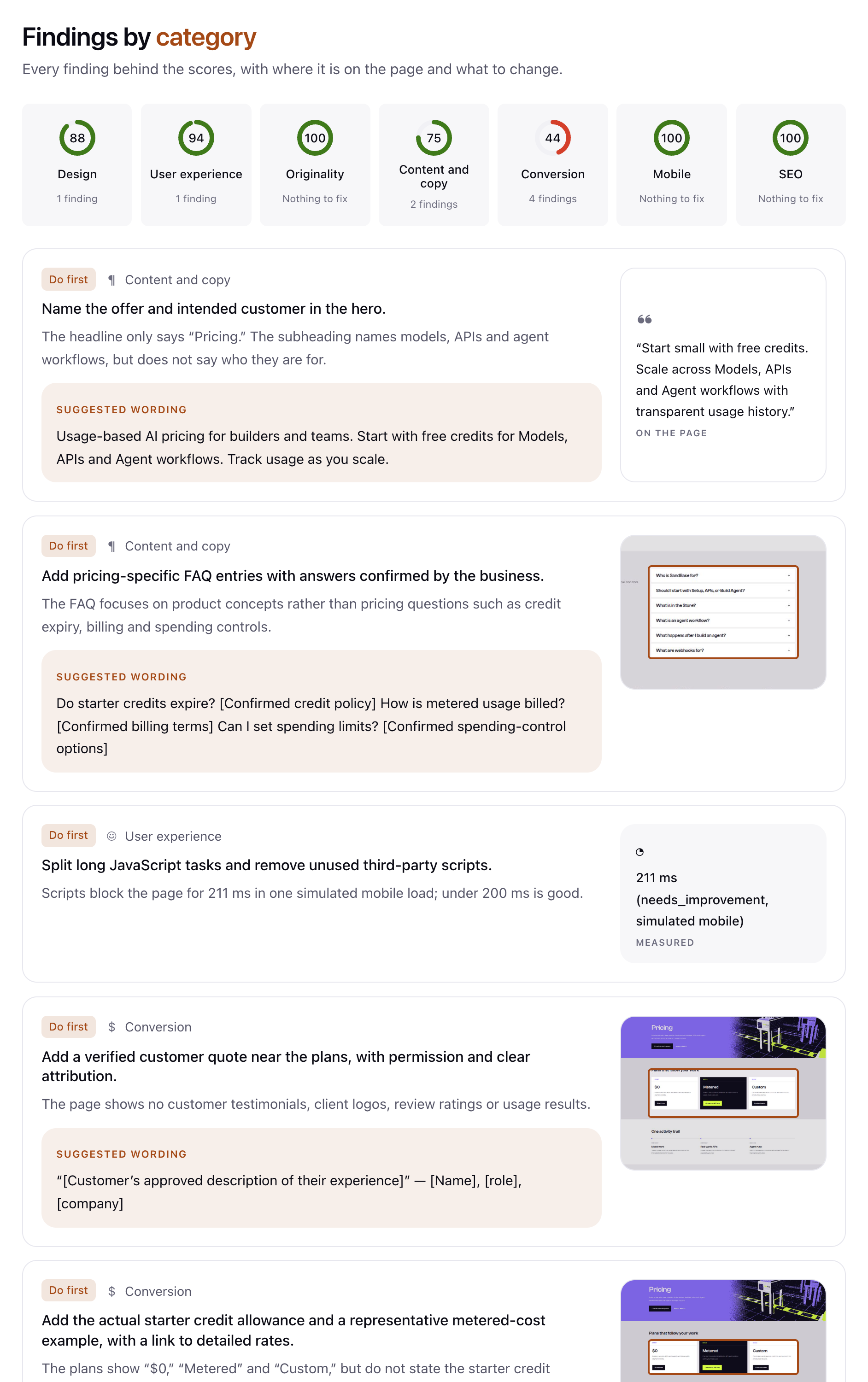 Findings by category: each finding shows what the page does now, why it costs visitors, the suggested change, and the evidence (here, the exact text quoted from the page).
Below the summary, every finding is listed by area with its evidence. There are three kinds:
- A quote for findings about words, copied exactly from the page.
- A measured value for speed and technical findings, such as “211 ms (needs improvement, simulated mobile)”.
- A marked region of the full-page screenshot for findings about a place on the page, such as a call to action buried below a long section.
The evidence is what makes the report usable with a team or a client. Nobody has to trust the score; they can look at the quote or the marked crop and decide whether they agree.
How to get the most out of three runs
- Pick your highest-traffic page first. Usually the home page or the main landing page. A fix there is worth more than a perfect score on a page nobody visits.
- Run your page, then a competitor’s. RoastWeb works on any public URL. Seeing how a competitor’s pricing page handles proof and calls to action is often faster than reading a CRO guide.
- Keep one run for after the fixes. Ship the “Do first” items, roast the page again and compare the two reports in your History. Check whether each finding you worked on is gone; the AI may also word a remaining issue differently or raise a new one.
- Use the export. Download the report as PDF for a client or a board, or copy it as Markdown into your issue tracker.
Where RoastWeb’s judgement ends
- One page, not a site crawl. RoastWeb reviews the URL you give it. It does not crawl your site or find broken links across hundreds of pages.
- Public pages only. Pages behind a login, or that block automated loading, cannot be reviewed fully. If the screenshots fail, the review falls back to the page text.
- AI findings are an expert opinion. Design, copy and conversion findings come from a model reading your page. They are specific and come with proof, but they are not user research. A/B test the big changes when you have the traffic to do it.
- Search numbers are estimates. Visits, backlinks and keyword counts come from third-party data, not from your analytics.
FAQ
Is RoastWeb free? Yes. Sign in with Google and you get 3 free runs of RoastWeb, plus 3 runs of each other Growth Atlas tool.
Does the AI really see my site? Yes. The model receives the page outline and the desktop, phone and full-page screenshots, so it can comment on layout and the phone view, not only the text.
Can I roast a competitor’s site or a client’s site? Yes. Any public page works, and the PDF export is made for sharing with clients.
Is my report stored? It is saved to your account’s History, visible only to you, and you can delete it.
How is this different from SEO Check? RoastWeb reviews one page for visitors: copy, design, conversion, speed and the basics of on-page SEO. SEO Check looks at a whole domain in search: traffic, authority, backlinks, keywords and competitors.
Try it and go further
Run RoastWeb on your own page. If you want to see how RoastWeb fits with the other three tools, read the Growth Atlas overview. Developers can call the same screenshot, Lighthouse and backlink endpoints through the DataForSEO APIs on SandBase.
Sources: growatlas.ai/tools/roast and its sample report (sandbase.ai/pricing, run 2026-10-16), retrieved 2026-11-20. Model choices and limits can change; the live tool page is authoritative.